
Understand the audience CRM
The audience CRM gives you a workspace-level view of everyone who has registered for or watched your broadcasts. It is designed to help you quickly separate upcoming attendees, engaged viewers, and people who missed a session.
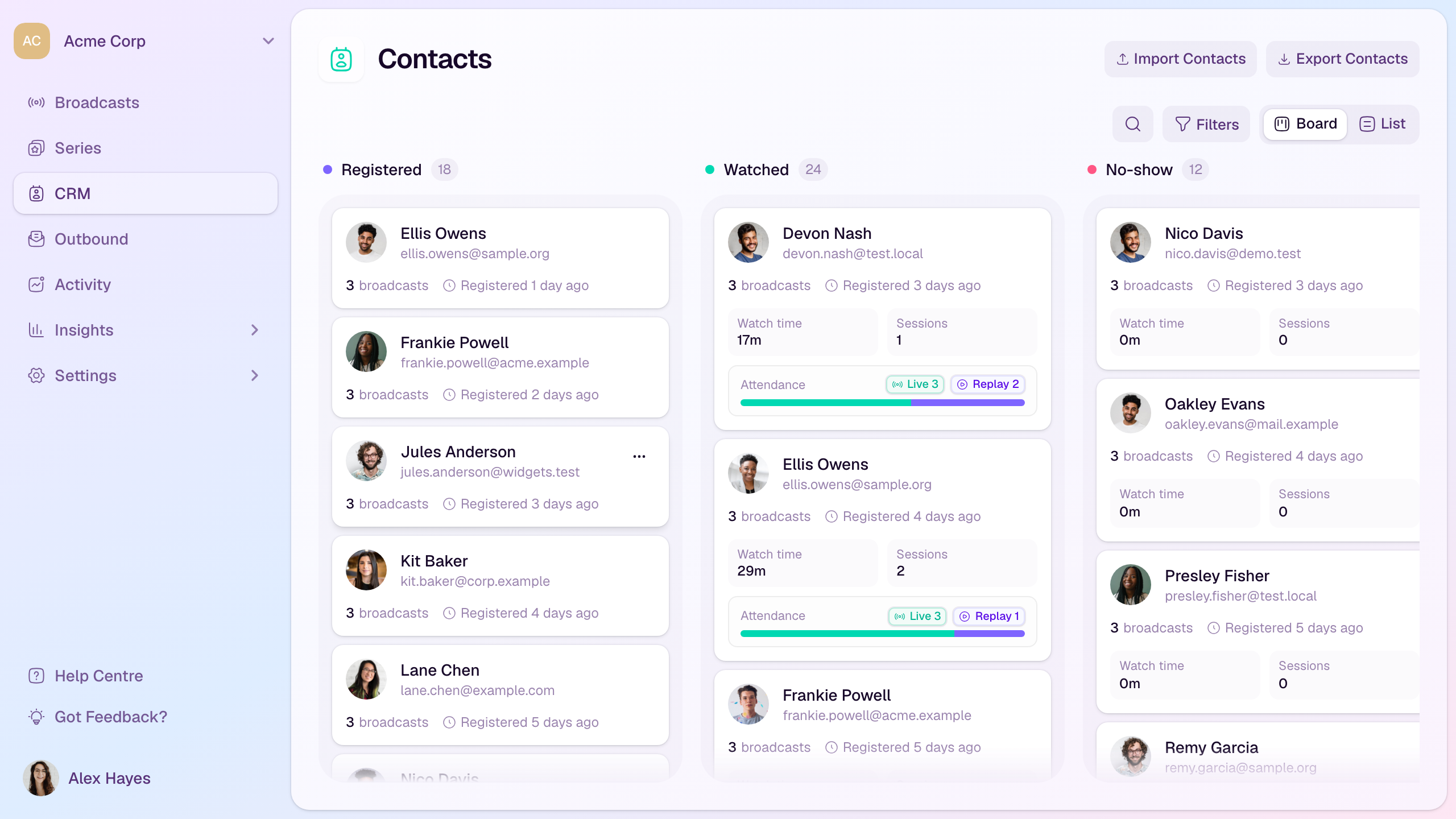
CRM columns
Registered: contacts who have registered and have not yet watched a broadcast in the current view.
Watched: contacts with live or replay viewing activity.
No-show: contacts who registered for past broadcasts but have not watched.
What each card shows
The contact name and email address.
How many broadcasts they registered for.
When they most recently registered.
For watched contacts, total watch time and session count.
Whether attendance came from live viewing, replay viewing, or both.
Find the contacts you need
Use search to find a contact by name or email address.
Use Filters to narrow the board by broadcast.
Use the registration date range control to focus on contacts who registered during a specific period.
When filters are active, each column shows matching contacts with the most recent matching registrations first.
Switch between board and list views depending on whether you want status columns or a denser list.
Use Export Contacts when you need a file for analysis or follow-up work outside HeyStream.
When to use it
Before a broadcast, check who has registered and whether key attendees are in the audience list.
After a broadcast, identify watched contacts for follow-up and no-shows for replay reminders.
During campaign review, compare live and replay engagement across your audience.