
Viewer access issues
Use this guide when a viewer cannot reach the watch page, says they did not receive their watch link, or sees the access screen instead of the broadcast.
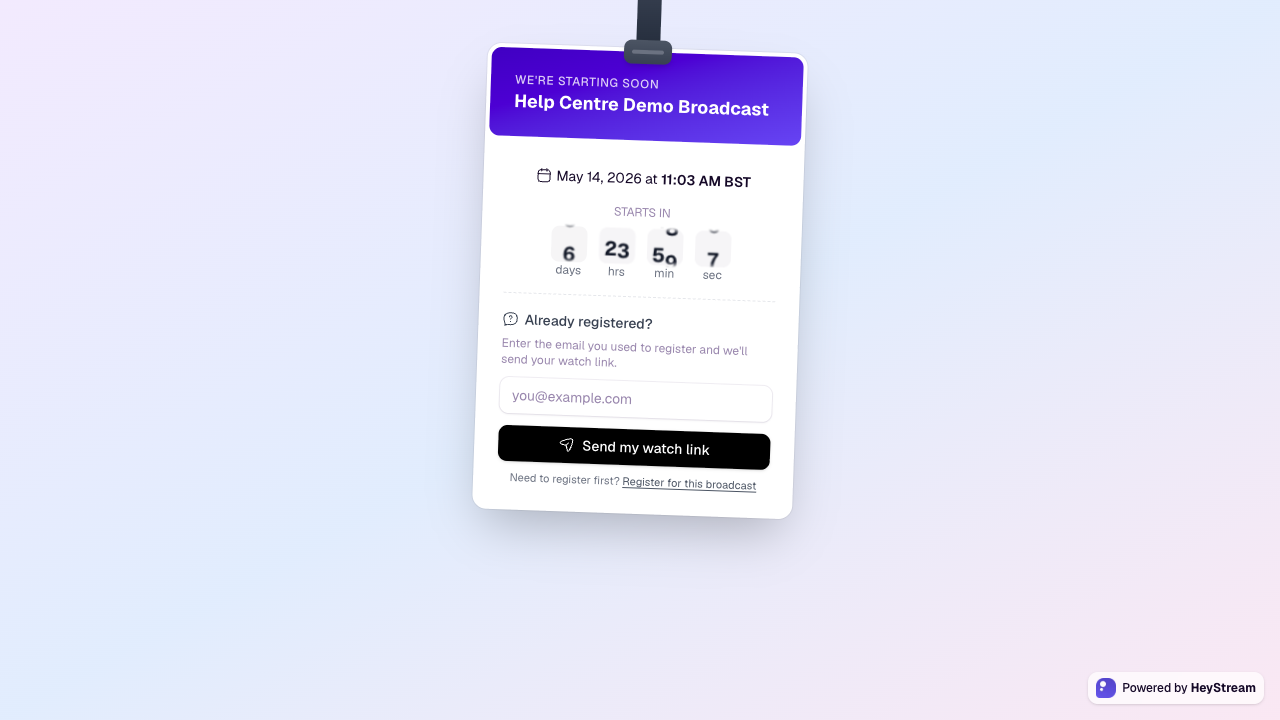
How viewer access works
Viewers normally register first, then use their personal watch link to access the broadcast or replay.
The watch access screen can resend the watch link when the viewer enters the same email address they used to register.
Personal watch links should not be forwarded, because the link identifies the registered contact.
Viewer did not receive a watch link
Ask the viewer to check spam, promotions, focused inbox, and any company email filtering.
Ask them to enter their registration email on the watch access screen and request the watch link again.
Confirm they used the same email address when registering. Small differences such as aliases or misspellings matter.
Find the contact in the audience CRM and confirm that their registration exists for the right broadcast or series session.
If needed, send the viewer the correct registration or watch access link again from your own email system.
Viewer is not recognized
Make sure they are entering the exact email address used at registration.
If someone registered on their behalf, ask for the email address that was entered in the form.
If they registered for another broadcast in the series, send them the link for the correct session.
If they never completed registration, ask them to register first from the hosted registration page or embedded widget.
Broadcast or replay is not available
Check the broadcast date and time. Before the event, viewers may see a waiting or countdown state.
If the event should be live, confirm the broadcast has been started from the studio.
If the viewer expects a replay, confirm the broadcast has a completed recording and that replay access is enabled.
If the broadcast was deleted, duplicated, or replaced, share the current registration or watch link.
Playback problems after access is granted
Ask the viewer to refresh the page and try again in a current browser.
Ask them to disable aggressive ad blockers or privacy extensions for the watch page.
If they are on a restricted corporate network, ask them to try a different network or device.
If many viewers report the same issue, check the studio stream status and contact support with the broadcast link and time of the issue.