
Lifecycle emails: confirmations, reminders, and replays
HeyStream can send key lifecycle emails automatically, including registration confirmations, attendee reminders, presenter reminders, and replay follow-ups. These emails live in the Transactional tab of Outbound.
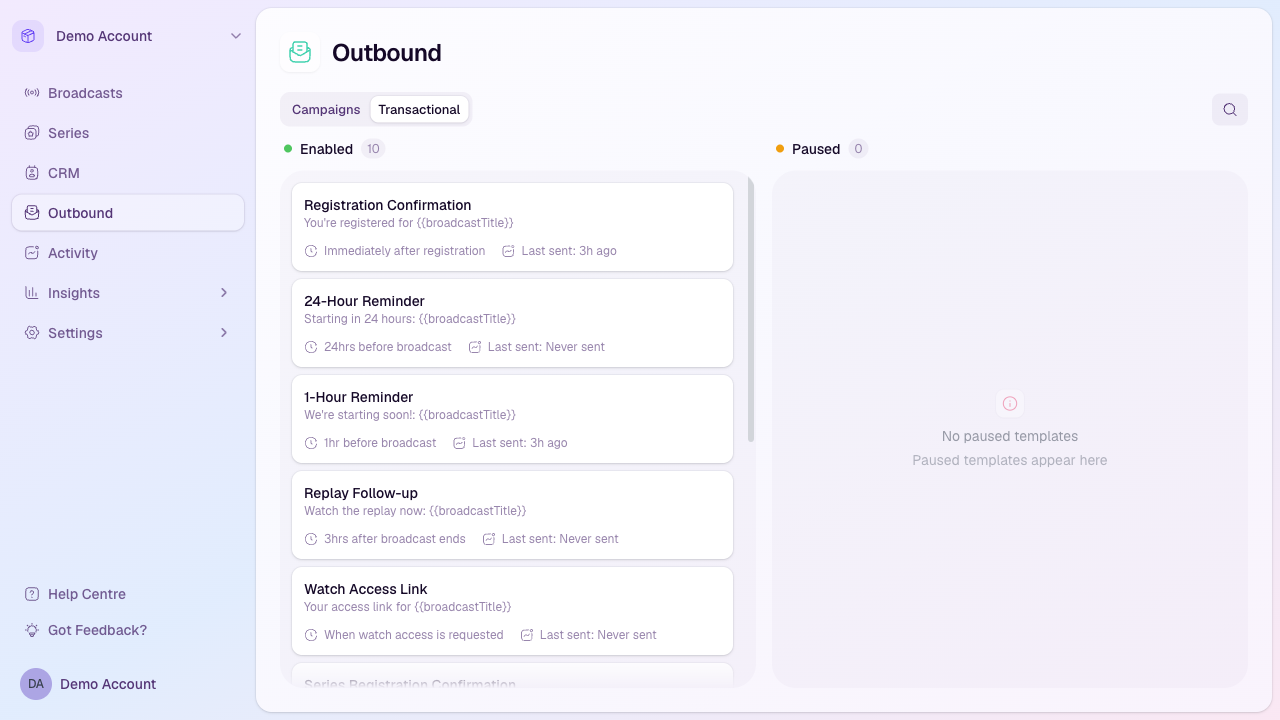
Open lifecycle emails
Automatic workspace emails, including registration confirmations, reminders, and replay follow-ups, require the workspace owner's account email to be confirmed and their paid plan to be active after the trial. Sending previews has the same requirements. An enabled template will not send while the account is ineligible. Do not assume missed messages will be sent automatically when access is restored; review the relevant send history and timing first. If an action is blocked, follow Confirm email, View trial, or View billing as shown in HeyStream. If you are a teammate, ask the workspace owner to confirm the owner's email address or resolve the account's billing status.
Open Outbound from the workspace sidebar.
Select the Transactional tab.
Review the Enabled and Paused columns to see which templates are currently active.
Available lifecycle emails
Registration Confirmation: sent immediately after someone registers for a broadcast.
Series Registration Confirmation: sent when someone subscribes to a series.
24-Hour Reminder and 1-Hour Reminder: sent before the broadcast starts.
Replay Follow-up: sent after the broadcast ends, when replay follow-up is enabled.
Presenter Added Confirmation, Presenter 24-Hour Reminder, and Presenter 1-Hour Reminder: sent to presenters around their assigned broadcast.
Manage a lifecycle email
Each template card shows its subject, send timing, and the last time it was sent. Open the card actions menu to customize the email, pause or resume it, send a preview, view send history where available, or reset it to the default template.
What pausing means
When a transactional template is paused, HeyStream stops sending that email for the workspace until you resume it. Use this when you need to temporarily hold a specific lifecycle email while you adjust copy or timing.